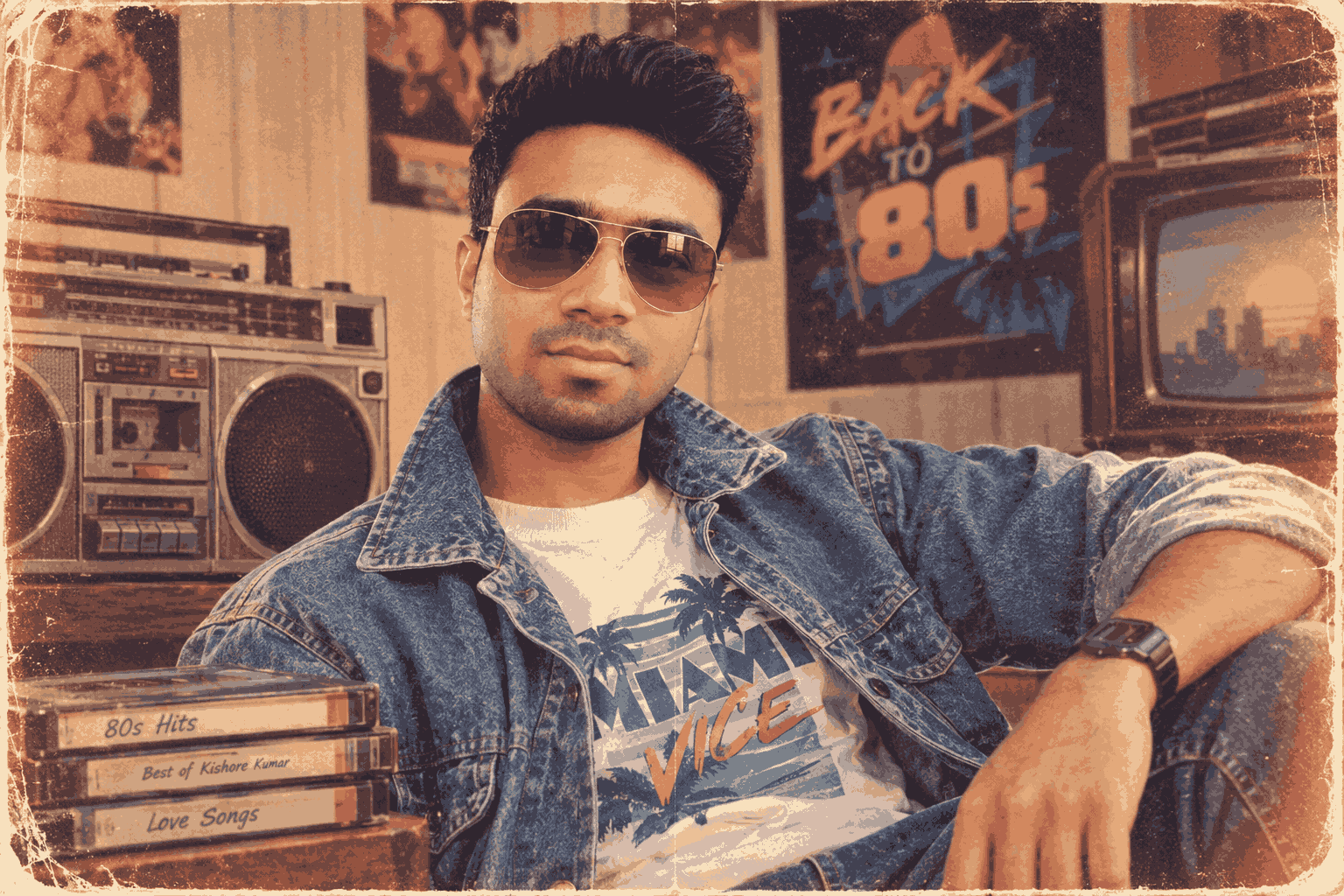
ChatGPT 1980s AI Photo Trend: Best Prompts to Create Retro Photos
The 1980s AI photo trend is becoming a popular way to transform ordinary photographs into nostalgic retro-style portraits. With the help of AI image-generation and editing tools, users can recreate the fashion, colors, lighting, hairstyles, interiors, and photography styles associated with the 1980s.
From vintage studio portraits to classic street photography, these AI-generated images can give modern photos an authentic old-school appearance. The trend is especially popular on social media because it combines nostalgia, creativity, and modern AI technology.
In this guide, you will find the best ChatGPT 1980s AI photo prompts, tips for creating realistic retro photographs, and ideas for different 1980s-inspired styles.
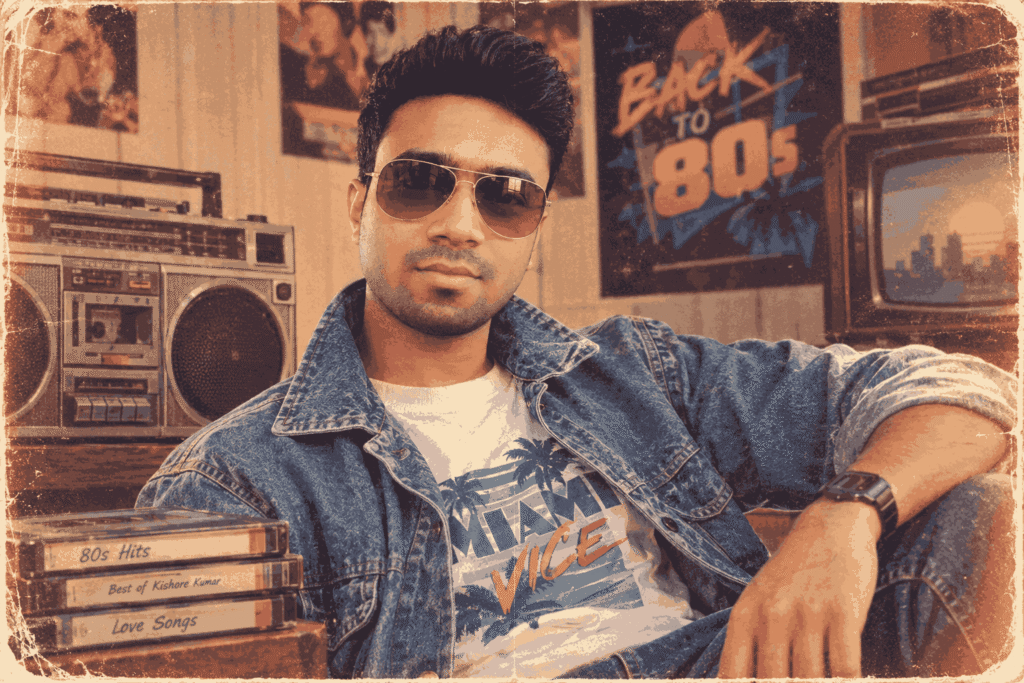
What Is the ChatGPT 1980s AI Photo Trend?
The ChatGPT 1980s AI photo trend refers to using detailed AI prompts to create or transform photographs with a visual style inspired by the 1980s.
The goal is not simply to make an image look old. A good 1980s-style prompt describes the complete visual atmosphere, including:
- Vintage clothing
- 1980s hairstyles
- Analog film grain
- Retro color tones
- Flash photography
- Classic cars
- Old-fashioned interiors
- Neon signs
- Vintage cameras
- Period-appropriate accessories
- Soft or slightly faded colors
- Authentic photographic imperfections
AI can combine these elements to create a convincing retro aesthetic while maintaining the main characteristics of the subject.
Why Are 1980s AI Photos Trending?
The 1980s have a distinctive visual identity that makes them ideal for AI image creation. Bright colors, denim fashion, leather jackets, cassette players, arcade games, dramatic hairstyles, and analog photography all contribute to the nostalgic appearance.
Another reason for the trend is social media. Users can turn ordinary selfies into creative vintage portraits and share them as Instagram posts, reels, profile pictures, or short-form video content.
The trend also allows people to experiment with different versions of themselves without needing an actual vintage photoshoot.
Best ChatGPT Prompt for a 1980s Retro Photo
Use the following prompt as a starting point when transforming your photograph:
Prompt:
Transform the uploaded photo into an ultra-realistic 1980s retro photograph. Preserve the person’s identity, facial structure, natural skin texture, hairstyle characteristics, and recognizable features. Recreate the visual atmosphere of an authentic 1980s photoshoot with vintage fashion, period-appropriate styling, analog film photography, subtle film grain, natural imperfections, slightly faded colors, warm tones, realistic flash lighting, soft shadows, and a nostalgic photographic texture. Add authentic 1980s details in the environment without making the image look artificial or digitally generated. The final result should resemble a professionally captured photograph from the 1980s, with realistic proportions, natural facial details, cinematic composition, and genuine vintage character.
10 Best 1980s AI Photo Prompts
1. Classic 1980s Studio Portrait
Create an ultra-realistic vintage 1980s studio portrait using the uploaded photo as the identity reference. Preserve the person’s face and recognizable features. Dress the subject in authentic 1980s fashion with a classic hairstyle and subtle accessories. Use a simple studio backdrop, soft professional lighting, analog film grain, warm tones, slight color fading, realistic skin texture, and authentic vintage photography imperfections. Make the image look like a professionally printed 1980s portrait photograph.
2. 1980s Street Style
Transform the uploaded photo into an authentic 1980s street-fashion photograph. Preserve the subject’s identity and facial characteristics. Place the person on a busy retro city street surrounded by vintage cars, old storefronts, classic advertisements, and period-appropriate architecture. Add denim, leather, sneakers, retro sunglasses, and authentic 1980s clothing. Use analog film texture, realistic daylight, subtle grain, slightly faded colors, and documentary-style photography.
3. 1980s Bollywood-Inspired Portrait
Create a glamorous vintage Indian film-inspired portrait with an authentic 1980s atmosphere. Preserve the person’s identity and facial features. Use elegant period fashion, dramatic studio lighting, retro Indian styling, classic accessories, rich textures, analog film grain, slightly faded colors, and cinematic composition. The scene should feel inspired by the visual language of 1980s Indian cinema without copying any specific actor, movie poster, or copyrighted artwork.
4. 1980s Couple Photo
Transform the uploaded couple photograph into a romantic 1980s vintage portrait. Preserve both people’s identities, facial structures, expressions, and natural appearance. Dress them in authentic 1980s fashion and place them in a nostalgic retro setting. Use warm analog lighting, subtle film grain, natural photographic imperfections, slightly faded colors, soft shadows, and realistic film texture. Make it look like a genuine photograph captured on an analog camera during the 1980s.
5. 1980s College Fashion
Recreate the uploaded photograph as an authentic 1980s college portrait. Preserve the subject’s identity and facial features. Add period-appropriate casual clothing, classic hairstyles, backpacks, books, bicycles, and a vintage college environment. Use realistic analog photography, mild film grain, warm colors, natural lighting, soft contrast, and subtle imperfections. Avoid modern objects, smartphones, contemporary clothing, or modern architecture.
6. 1980s Nightclub Photo
Turn the uploaded photo into an ultra-realistic 1980s nightclub photograph. Preserve the person’s identity and facial details. Create a retro nightclub environment with neon lighting, colorful reflections, vintage fashion, classic hairstyles, and atmospheric haze. Use direct on-camera flash, analog film grain, realistic shadows, slight motion blur, rich retro colors, and authentic photographic imperfections.
7. 1980s Family Album Photograph
Transform the uploaded image into a nostalgic 1980s family-album photograph. Preserve the identity and natural facial features of every person. Use a modest vintage home interior, period furniture, classic clothing, warm indoor lighting, analog camera characteristics, slight film grain, faded colors, soft focus, and realistic photographic imperfections. Make it feel like a genuine family photograph discovered in an old photo album.
8. 1980s Classic Car Portrait
Create an ultra-realistic 1980s fashion portrait featuring the person standing beside a classic 1980s automobile. Preserve the subject’s identity and facial structure. Add authentic retro clothing, vintage sunglasses, classic hairstyle, an old city street, and period-appropriate environmental details. Use analog film photography, subtle grain, warm sunlight, realistic reflections, slightly faded colors, and cinematic composition.
9. 1980s Vacation Photograph
Recreate the uploaded image as a nostalgic 1980s vacation photograph. Preserve the person’s identity and natural appearance. Place the subject at a vintage travel destination with period-appropriate clothing, luggage, sunglasses, film cameras, and environmental details. Use authentic analog film characteristics, natural sunlight, subtle grain, slightly faded colors, realistic shadows, and candid family-photo composition.
10. 1980s Passport-Style Portrait
Convert the uploaded photograph into a realistic 1980s-style formal portrait. Preserve the person’s exact identity and facial structure. Use a simple vintage studio background, period-appropriate hairstyle and clothing, soft flash lighting, analog film grain, natural skin texture, slightly muted colors, and subtle photographic imperfections. Keep the composition simple and realistic, like a genuine photograph taken in the 1980s.
Best Prompt Formula for 1980s AI Photos
If you want to create your own prompts, use this structure:
Subject + Identity Preservation + 1980s Fashion + Environment + Lighting + Camera Style + Film Texture + Color + Composition
For example:
Subject: young man standing beside a vintage car
Identity: preserve exact facial identity and natural features
Fashion: 1980s denim jacket, sneakers and retro sunglasses
Environment: old city street with vintage storefronts
Lighting: direct flash with soft ambient light
Camera: analog 35mm photography
Texture: realistic film grain and subtle imperfections
Color: warm, slightly faded colors
Composition: candid cinematic portrait
Combining these elements gives the AI enough information to create a more convincing result.
How to Make Your AI Photo Look More Authentic
Simply adding “1980s” to a prompt may not produce a convincing vintage image. For better results, describe the characteristics of real analog photography.
Use Analog Film Characteristics
Include terms such as:
- 35mm film photography
- Analog camera
- Natural film grain
- Slight exposure variation
- Subtle color fading
- Realistic photographic imperfections
- Soft contrast
- Vintage print texture
Add Period-Appropriate Clothing
Avoid modern clothing when creating a historical look. Instead, mention details such as:
- Denim jackets
- High-waisted trousers
- Leather jackets
- Retro sneakers
- Classic sunglasses
- Printed shirts
- Vintage dresses
- Traditional 1980s Indian fashion
Remove Modern Objects
For a believable result, ask the AI to avoid:
- Smartphones
- Modern cars
- Contemporary buildings
- Wireless earbuds
- Modern logos
- Modern street signs
- Current fashion trends
Negative Prompt for 1980s AI Photos
A negative prompt can help reduce unwanted elements:
Avoid modern smartphones, modern cars, contemporary clothing, futuristic objects, excessive digital sharpness, plastic skin, artificial facial features, distorted hands, extra fingers, unrealistic eyes, excessive HDR, CGI appearance, modern architecture, text errors, watermarks, and cartoon-like rendering.
1980s AI Photo Ideas for Instagram
You can experiment with several concepts for social media:
- 1980s childhood photo recreation
- Retro college portrait
- Vintage couple photograph
- 1980s Bollywood-inspired fashion
- Classic car photoshoot
- Retro wedding portrait
- Old-school family album
- 1980s street fashion
- Vintage vacation photograph
- Retro studio portrait
- 1980s office photograph
- Old-school musician aesthetic
- Retro birthday party
- 1980s sports portrait
- Vintage café photograph
How to Create a 1980s AI Photo From Your Own Picture
Creating the trend is relatively straightforward.
Step 1: Choose a Clear Photograph
Select a high-quality image where the face is clearly visible. Front-facing or three-quarter photographs generally provide better reference information.
Step 2: Upload the Image
Upload your photograph to an AI image-editing tool that supports image references.
Step 3: Add a Detailed Prompt
Instead of writing only “make this photo 1980s,” describe the clothing, location, lighting, camera characteristics, colors, and film texture.
Step 4: Request Identity Preservation
If maintaining your appearance is important, explicitly ask the AI to preserve facial identity and recognizable features.
Step 5: Refine the Result
If the first generation looks too modern, add terms such as analog film, 35mm photography, vintage flash, period-accurate clothing, faded colors, and natural film grain.
1980s AI Photo Trend vs Modern AI Portrait
| Feature | 1980s AI Photo | Modern AI Portrait |
|---|---|---|
| Photography | Analog-inspired | Digital |
| Texture | Film grain | Very sharp |
| Colors | Slightly faded | Vibrant |
| Lighting | Flash/soft studio | Cinematic/controlled |
| Clothing | Retro fashion | Contemporary fashion |
| Environment | Vintage locations | Modern locations |
| Appearance | Nostalgic | Polished |
The major difference is the intentional use of imperfections. A realistic vintage photograph should not look excessively clean or digitally perfect.
Common Mistakes When Creating Retro AI Photos
1. Using Only One Keyword
Writing “1980s photo” gives the AI very little direction.
2. Adding Too Many Random Details
An overloaded prompt can create inconsistent clothing, backgrounds, or objects. Focus on the most important visual characteristics.
3. Making Everything Too Colorful
Although the 1980s had bold colors, real photographs from the period can also have muted or faded tones. Balance the color description with realistic film characteristics.
4. Ignoring the Background
A modern background can make an otherwise vintage portrait look unrealistic. Describe the environment as carefully as the subject.
5. Overusing AI Effects
Excessive glow, perfect skin, unrealistic sharpness, and dramatic CGI effects can destroy the authentic analog appearance.
SEO Keywords for the 1980s AI Photo Trend
For bloggers and content creators, relevant search phrases include:
- ChatGPT 1980s AI photo trend
- 1980s AI photo prompts
- best retro AI photo prompts
- vintage photo AI prompts
- ChatGPT retro photo prompt
- AI 80s photo trend
- 80s AI image prompt
- how to create 1980s AI photos
- vintage AI photo editing
- retro photo prompts
- AI vintage portrait
- 1980s photo editing prompt
Use these keywords naturally rather than repeating the same phrase excessively.
Frequently Asked Questions
What is the 1980s AI photo trend?
The 1980s AI photo trend uses AI image-generation or editing tools to recreate photographs with the fashion, lighting, colors, environments, and analog film characteristics associated with the 1980s.
What is the best prompt for an 80s AI photo?
A strong prompt should describe the subject, identity preservation, 1980s clothing, environment, analog camera style, lighting, film grain, colors, and photographic imperfections.
Can I turn my selfie into an 1980s photo?
Yes. An image-capable AI editor can use your selfie as a reference and apply a retro 1980s visual style.
How do I make an AI photo look like real film?
Mention 35mm analog photography, natural film grain, subtle color fading, realistic exposure, soft contrast, vintage flash, and authentic photographic imperfections.
Can I create an 1980s couple photo with AI?
Yes. Upload a suitable couple photograph and specify the desired 1980s clothing, location, lighting, film characteristics, and composition.
How can I make my retro AI photo look less artificial?
Avoid excessive sharpness, unrealistic skin, heavy HDR, excessive glow, and CGI effects. Adding realistic film grain, natural lighting, subtle imperfections, and period-appropriate details can create a more convincing result.
Final Thoughts
The ChatGPT 1980s AI photo trend provides an exciting way to combine modern AI technology with the nostalgic visual language of vintage photography. The key to getting realistic results is to go beyond simply mentioning “1980s.”
Describe the fashion, hairstyle, environment, lighting, camera type, film texture, colors, and imperfections. When these elements work together, an ordinary photograph can be transformed into a convincing retro-style image.
Whether you want a vintage family portrait, classic car photoshoot, retro couple picture, college photograph, or 1980s-inspired fashion portrait, these prompts can serve as a starting point for creating unique AI images for blogs and social media.
Pro Tip: For the most authentic results, combine a clear reference photograph with a detailed prompt and make small adjustments between generations rather than changing everything at once.